
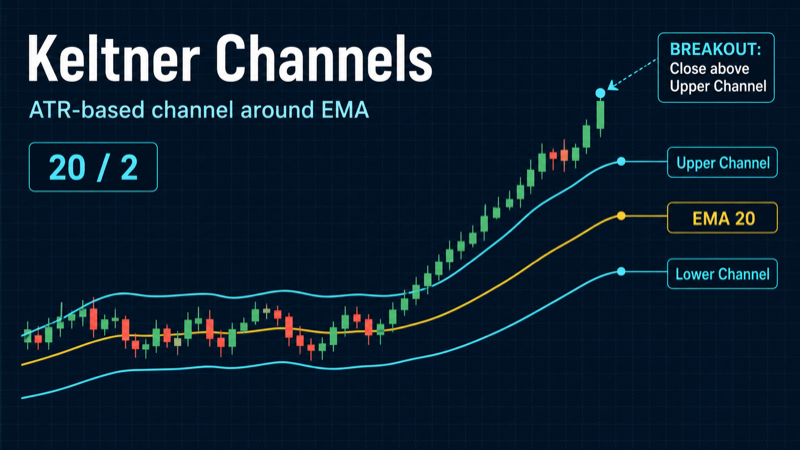
The Start Bots Signal category describes signals and indicators that can start a trading bot. One of the technical indicators is Keltner Channels.
When creating or editing any bot, there is a Start signal builder block at the bottom of settings. You can choose individual indicators, ready-made presets, and their combinations. Conditions are grouped: AND inside a group, OR between groups. The same indicator can be configured in different ways - for Long and Short, for breakouts and bounces, for level comparisons and for crosses.
What are Keltner Channels
Keltner Channels are a volatility channel indicator developed by Chester Keltner and later refined by Linda Raschke Bradford. Three lines: upper, middle - an exponential moving average (EMA) - and lower. Channel width is determined not by standard deviation but by ATR (Average True Range) - the average true range of each candle.
In the ELIXOAI start signal builder, conditions compare price to channel lines or track crosses of price with upper and lower boundaries. When price exits the channel, it signals an extreme move relative to current volatility; a return inside the channel is a classic mean-reversion signal.
Keltner Channels are often used for trend trading: in an uptrend price “rides” the upper band or stays above the middle line; in a downtrend it stays near the lower band. For counter-trend strategies, presets on boundary breaks and returns into the channel work well.
How Keltner Channels work
The Keltner Channel calculation in the builder (via TAAPI) works as follows:
- Middle line: EMA of closing price over
periodcandles (default 20). - ATR: average true range over
atrLengthcandles (default 10). True Range accounts for gaps between candles - ATR reflects real move amplitude. - Upper band: middle +
multiplier× ATR (default multiplier = 2). - Lower band: middle − multiplier × ATR.
When volatility rises, ATR increases and the channel widens; in flat markets ATR falls and bands narrow. Unlike oscillators, Keltner Channels show price position relative to a dynamic channel, not a 0–100 value.
In the builder you set a comparison condition: “price greater than upper,” “price less than lower,” “price crosses below upper,” and so on. The system fetches live upper, middle and lower values from the exchange via TAAPI and checks the condition on your timeframe - at candle close or every minute.
Keltner Channels vs Bollinger Bands
Both indicators build a three-line channel, but width calculation differs fundamentally:
- Bollinger Bands: center - SMA, width - standard deviation (stddev). Bands react quickly to price spikes and “inflate” on impulse candles.
- Keltner Channels: center - EMA, width - ATR × multiplier. The channel is smoother, less sensitive to single extreme candles; better reflects sustained volatility.
In practice: when Bollinger Bands have narrowed (squeeze) but Keltner is still wide - the market is “compressed” by stddev while ATR has not yet fallen. Combining both channels (KC inside BB) is a popular filter for breakout strategies. For mean reversion Keltner gives fewer false boundary touches on wicks; for trends - a more stable middle line (EMA vs SMA).
Keltner Channels parameters
All Keltner Channels presets in the builder share three parameters:
- EMA period (period, default 20): number of candles for the middle line. A shorter period (10–14) makes the channel more sensitive; a longer one (50) smooths the average for swing on 4h–1d.
- ATR multiplier (multiplier, default 2): channel width in ATR units. Value 1.5 - narrow channel, more boundary touches; 2.5–3 - fewer breaks but stronger extremes.
- ATR period (atrLength, default 10): number of candles for ATR calculation. Short (5–7) - channel expands faster on volatility spikes; long (14–20) - more stable width.
Indicator outputs: upper (upper band), middle (middle EMA), lower (lower band). In all presets the comparison target is price; you choose which channel line to compare it to.
Ready-made presets in the builder
The builder offers four ready-made Keltner Channels presets. Each can be customized: different operator, different output (middle), different parameters or timeframe.
Price above upper - Short (keltner_value_down)
Default condition: price is greater than the upper band (upper) on the selected timeframe (15m interval, check at bar close).
A Short signal on overbought conditions relative to current volatility - price exited the upper channel boundary. The bot starts when upward momentum is “overheated” by ATR standards. Fits short grids at local peaks or counter-trend entries expecting a return to the middle line.
Available operators: greater than, less than, greater or equal, less or equal, crosses above, crosses below. You can use middle as an alternative output for trend conditions.
Price below lower - Long (keltner_value_up)
Default condition: price is less than the lower band (lower).
A Long signal on oversold conditions - the mirror of the preset above. The bot starts when price drops below the lower channel boundary. Often used for long grids on pullbacks or DCA entries expecting a bounce toward middle.
Cross below upper - Short (keltner_cross_down)
Default condition: price crosses the upper band from above to below (cross down through upper).
A “return into the channel” signal after an upward break. Unlike keltner_value_down, price does not need to be above upper right now - what matters is the cross: price was above the upper boundary and moved back inside. Softer and confirms reversal or pullback start.
Cross above lower - Long (keltner_cross_up)
Default condition: price crosses the lower band from below to above (cross up through lower).
The classic mean-reversion signal: price exited the lower boundary and returned into the channel. Useful for bounces after sharp drops - the bot catches a return to the middle line rather than catching a falling knife at the break moment.
General builder settings
- Timeframe (interval): 1m, 5m, 15m, 30m, 1h, 4h, 1d. Shorter intervals give more signals but more noise. Swing bots often use 1h–4h; scalping uses 5m–15m.
- Check mode: At candle close checks after the candle closes - fewer false triggers. Every minute checks inside the current candle - faster reaction, higher false-start risk.
- Operator: greater than, less than, crosses above, crosses below, greater or equal, and others define how the indicator value is compared to the target.
- Target value: a number (e.g. 30 for RSI), an indicator line (e.g. %D for Stochastic), or price (for Bollinger Bands).
- Condition groups: up to 3 groups with up to 5 conditions each. Example: group 1 - RSI < 30 AND price < lower band; group 2 - Stochastic < 20. The bot starts if group 1 OR group 2 is satisfied.
Setup examples for different strategies
Mean reversion (bounce from boundaries)
Goal: enter on price return to the middle line after an extreme exit.
- Long: keltner_cross_up on 15m (cross up lower), period 20, multiplier 2, atrLength 10, check at close.
- Short: keltner_cross_down on 15m (cross down upper).
- More aggressive alternative: keltner_value_up (price < lower) or keltner_value_down (price > upper) - more signals but higher risk of continuation.
Breakout (channel break)
Goal: start the bot on momentum continuation after a boundary exit.
- Long: manual setup - output
upper, operator crosses above, target price, on 1h after channel expansion. - Short: cross down through
lower- downward break in a strong downtrend. - Add a filter: price above
middleon 4h for Long - do not buy upper breaks against the global trend.
Squeeze (channel compression)
Goal: catch the first impulse after a low-volatility period.
- When upper and lower converge (ATR falls), the first break often starts a strong move.
- Long: cross up upper on 15m OR keltner_cross_up on 5m after a tight channel.
- Strengthen with a second group: Bollinger Bands also compressed (price between upper BB and lower BB KC) - classic “double squeeze.”
Keltner + RSI
Combining price position in the channel with oscillator momentum.
- Long: keltner_value_up (price < lower) on 15m AND RSI < 30 (period 14).
- Short: keltner_value_down (price > upper) AND RSI > 70.
- For trend pullbacks: keltner_cross_up lower on 15m AND RSI cross up 40 - softer than waiting for RSI < 30.
Keltner + Bollinger Bands
Two channels with different width logic - a powerful filter.
- Long: price below lower KC AND below lower BBands (20, 2) - double oversold.
- Short: price above upper KC AND above upper BBands.
- Squeeze breakout: BBands inside KC (narrow BB, wide KC) → cross up upper KC AND cross up upper BB - confirmed breakout.
multiplier 1.5 vs 2.5
Goal: tune boundary sensitivity.
- multiplier 1.5: narrow channel - keltner_value_up and keltner_value_down trigger more often. Useful on 5m–15m for mean-reversion scalping.
- multiplier 2.5: wide channel - fewer breaks but stronger signals. Cross presets (keltner_cross_up, keltner_cross_down) pair well with at candle close check mode.
period 20 vs 50
Goal: choose the middle-line horizon.
- period 20: standard for 15m–1h - EMA follows price quickly, channel is relevant for intraday trading.
- period 50: on 4h–1d - broader context, less noise; keltner_cross_up lower on 4h often means a larger bounce than on 15m.
Trend riding (riding the channel)
Goal: Long in uptrends, Short in downtrends - without counter-trend entries.
- Long: price cross up
middleon 1h (manual: output middle, operator cross up) AND price > middle on 4h. - Short: price cross down middle on 1h AND price < middle on 4h.
- In a strong trend price can stay between middle and upper for a long time - do not use keltner_value_down for Short until the trend weakens.
Scalping on 5m–15m
Goal: frequent starts on short bounces and channel returns.
- Long: keltner_cross_up, 5m, period 14, multiplier 1.5, atrLength 7, check at close.
- Short: keltner_cross_down, same settings.
Condition groups: practical example
A bot with two Long scenarios:
- Group 1: keltner_cross_up on 15m (return into channel) AND RSI 4h > 50 - trend pullback.
- Group 2: keltner_value_up (price < lower) on 15m AND RSI < 25 - aggressive counter-trend.
Groups are combined with OR: either scenario can start the bot. Configure Short symmetrically.
Tip
In a strong trend price can “ride the channel” - stay near the upper band in an uptrend or the lower band in a downtrend for a long time. Counter-trend presets keltner_value_down (Short) and keltner_value_up (Long) often start the bot against the main move. For trends use crosses in the direction of the move and a middle filter on a higher timeframe; for ranges use returns into the channel and boundary touches. Keltner is smoother than Bollinger Bands thanks to ATR - but that does not replace grid risk management.