
Bot Wizard creates a ready-made group of DCA bots in one operation. You can create up to 21 bots for different currencies instead of configuring them one by one. Each currency uses its own preset: grid coverage, safety orders, price steps, take profit and other parameters have already been selected for that market.
Important: presets, reserves and start signals do not guarantee a profit. Leverage increases both gains and losses. Check the settings against your own risk tolerance and current market conditions.
Before you start
- Add a supported exchange API key to DexBots and make sure it has the required trading permissions.
- Keep enough funds on the selected exchange account.
- Check your subscription and bot limits. The number selected in the wizard must fit within your remaining limit.
1. Configure the bots
Choose an API key
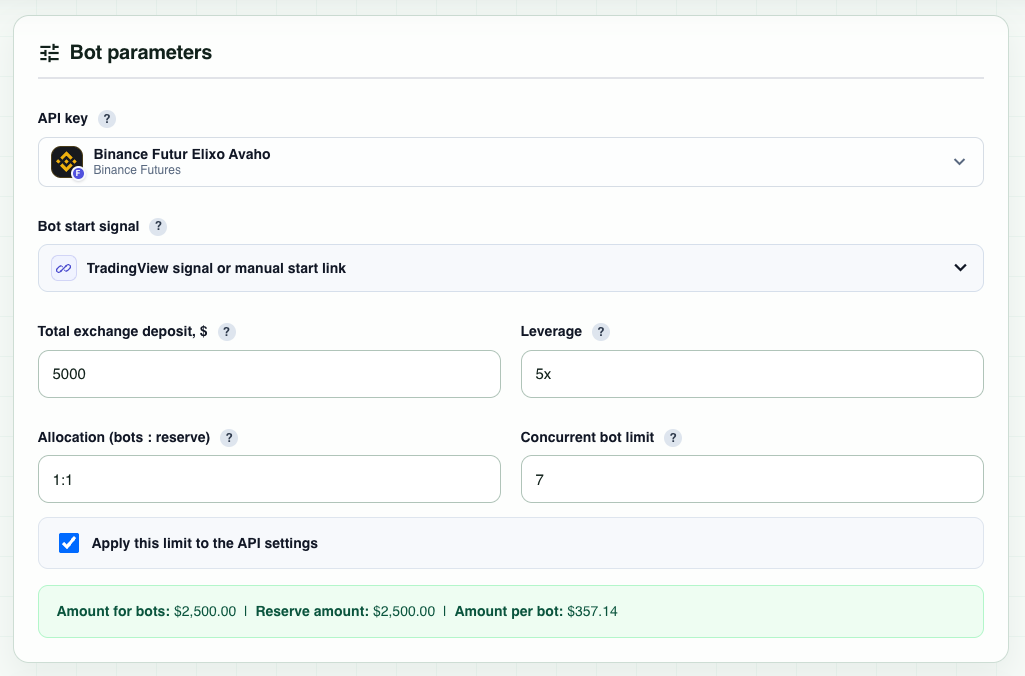
In API key, select the exchange account on which all the bots will be created. The balance and bot lock belong to this API key.
Choose the start signal
The wizard offers Dimkud Multi 30 min, Dimkud Multi 15 min, TradingView signal or manual start link, and TradingView Strategy. These presets are designed for the Dimkud Multi system, so the usual choice is one of the two Dimkud Multi signals. Each currency has its own signal and the bots do not necessarily start at the same time.
- Dimkud Multi 30 min: more frequent entries; generally suited to rising or sideways markets.
- Dimkud Multi 15 min: stricter and less frequent entries; may be preferred when the market is sideways with a downward bias.
These are general guidelines, not a prediction of market direction. If you choose TradingView or manual start, make sure you understand how those triggers will be delivered.
Enter the deposit and leverage
Total exchange deposit is the entire amount you want to assign to this bot group, including the trading portion and the reserve. Select leverage separately. The interface allows 1x–7x; up to 5x is recommended, while 1x–3x reduces leverage-related risk.
Set the bots-to-reserve ratio
The Allocation (bots : reserve) determines how the total amount is split. A 1:1 ratio splits it equally. A 1:2 ratio assigns one part to bots and keeps two parts in reserve, which is more conservative. The reserve stays on the exchange and is intended to support positions during a deep or prolonged drawdown.
Set the concurrent bot limit
This limit controls how many bots may trade at the same time, not how many will be created. For example, you can create 21 bots and allow no more than 7 to run simultaneously. Leave Apply this limit to the API settings enabled if you want the wizard to update the selected API key automatically. For a set of 15–20 bots, the interface recommends a limit of about 5–10.
The amount assigned to one bot is calculated from the trading portion divided by this concurrent limit. With a $5,000 deposit, a 1:1 ratio and a limit of 7, $2,500 is assigned to bots, $2,500 remains in reserve, and each bot receives $357.14. Although more than 7 bots may exist, only the permitted number can use this allocation at once.
2. Allocate funds and choose currencies
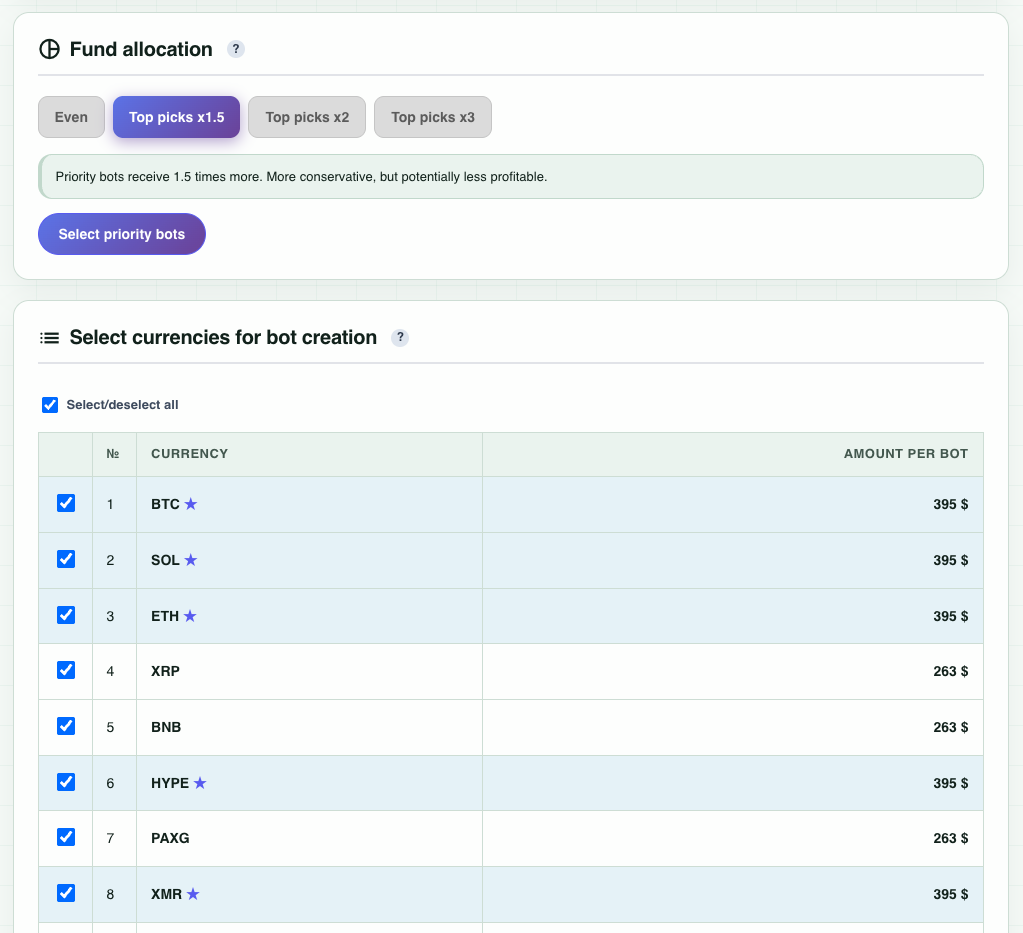
Choose one allocation mode:
- Even: every bot receives the same amount. This is the standard option.
- Top picks x1.5, x2 or x3: selected priority currencies receive 1.5, 2 or 3 times the amount assigned to a regular bot. Use Select priority bots to choose them.
The wizard recalculates all amounts while keeping the total simultaneous allocation within the amount reserved for bots. For example, with x2, a priority bot may receive about $200 while a regular bot receives about $100.
In Select currencies for bot creation, leave checked only the markets you want to trade. You do not have to create all 21 bots. For effective rotation, select more currencies than the concurrent bot limit. The amount displayed beside each currency is the amount that will be written into that bot's settings; the minimum is $25 per bot.
3. Review and create
- Check the API key, signal, leverage, total deposit, reserve, concurrent limit, allocation mode and number of selected bots in Preview.
- If everything is correct, click Create N bots.
- Keep the page open while the progress indicator is running. Creating a full set usually takes about 3–5 minutes.
When creation is complete, the bots are active and wait for their selected start signals. Open the bot management page to review them. A maximum of the number set in the concurrent bot limit can enter trades at the same time.