
Trading bot launch blocks: setting limits and preventing duplicate trades
When several trading bots use the same exchange API key, more than one of them may receive an entry signal at the same time. This deserves particular attention when the bots trade the same pairs or share one trading balance.
Launch blocks in ELIXOAI let you define in advance which bots may open trades simultaneously through one API connection. You can prevent multiple bots from trading the same pair at once, control Long and Short trades separately, set independent limits for each direction, and avoid using too much of the account balance when many signals appear together.
Launch blocks do not decide when a bot should enter the market and do not alter its strategy. The system checks them after a bot has met its entry conditions, just before opening a new position. The check determines whether the launch is allowed in view of the other active trades.
Where to find the launch block settings
The settings are configured separately for every exchange API connection.
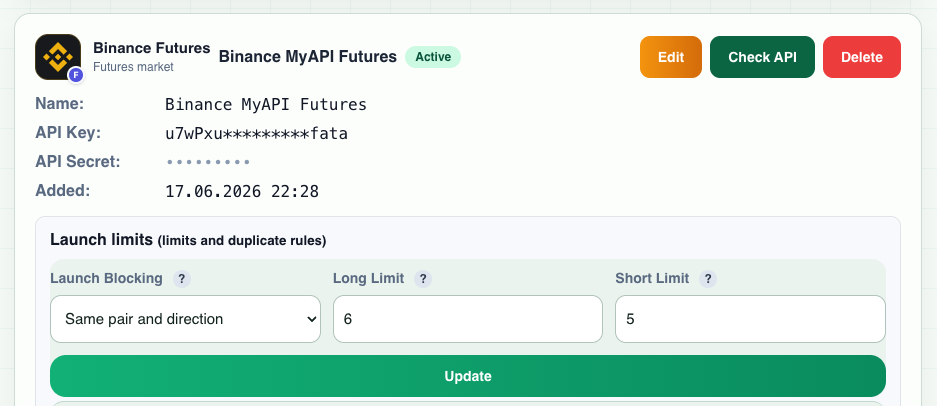
Open the API key management page, choose the required connection, and expand its additional settings. The "Launch limits (limits and duplicate rules)" area contains three fields:
- Launch Blocking
- Long Limit
- Short Limit
Launch blocking: how matching trading pairs are handled
This setting determines whether several bots may hold active trades on the same pair through one API connection. There are three modes:
- Same pair and direction
- Same pair in a trade
- Do not block duplicates
The difference is which existing trade the system treats as a conflict.
Option 1: Same pair and direction
A bot cannot open a trade if the same API connection already has an active trade on the same pair in the same direction.
Suppose you have three bots:
- BTC/USDT Long, bot 1
- BTC/USDT Long, bot 2
- BTC/USDT Short, bot 3
Bot 1 receives its signal first and opens BTC/USDT Long. Bot 2 can no longer open another BTC/USDT Long. Bot 3 can still open BTC/USDT Short if the other limits permit it.
In other words, a Long blocks another Long on the same pair, and a Short blocks another Short. The opposite direction remains available.
When to use it
Use this mode when you want to stop several strategies from trading one asset in the same direction, while still allowing a Long and a Short to coexist. ETH Long plus ETH Short is allowed; ETH Long plus another ETH Long is blocked.
Option 2: Same pair in a trade
This is the stricter mode. If a pair already has an active trade, no other bot using that API connection may open a new trade on the same pair, regardless of direction.
If SOL/USDT Long opens first, another bot cannot open SOL/USDT Long or SOL/USDT Short until the current trade closes. After that, the pair becomes available again.
Example
Assume four bots have been created:
| Bot | Pair | Direction |
|---|---|---|
| Bot 1 | BTC/USDT | Long |
| Bot 2 | BTC/USDT | Short |
| Bot 3 | ETH/USDT | Long |
| Bot 4 | ETH/USDT | Short |
Bot 1 opens BTC/USDT Long first. Bot 2 must now wait until BTC/USDT is released. The two ETH/USDT bots remain independent and may continue working under the other configured limits.
When to use it
Choose this mode when you want a simple rule: one trading pair, one active trade. It is useful when several strategies should not manage trades on the same asset at the same time.
Option 3: Do not block duplicates
An existing trade on a pair does not by itself prevent another bot from starting. One bot may open BTC/USDT Long, a second bot may open another BTC/USDT Long, and a third may open BTC/USDT Short. Long and Short limits and all other checks still apply.
When to use it
This mode is intended for configurations where several bots are deliberately allowed to trade the same instrument at once.
Use it carefully with futures. Depending on the exchange and its position mode, orders from several bots on one instrument may interact with a single exchange position. Before running several bots on the same pair, make sure you understand how the exchange and the selected account mode handle their orders.
Comparing the three modes
Assume BTC/USDT Long is already active on the API connection. The following table shows what happens when another bot receives a signal.
| New signal | Same pair and direction | Same pair in a trade | Do not block duplicates |
|---|---|---|---|
| BTC/USDT Long | Blocked | Blocked | Allowed |
| BTC/USDT Short | Allowed | Blocked | Allowed |
| ETH/USDT Long | Allowed | Allowed | Allowed |
| ETH/USDT Short | Allowed | Allowed | Allowed |
"Same pair and direction" blocks only a duplicate in the same direction. "Same pair in a trade" reserves the pair completely for the bot that is already working. "Do not block duplicates" adds no restriction based on matching pairs.
Long limit
The Long Limit is the maximum number of simultaneously active Long trades for that API connection.
For example, Long Limit: 5 means that no more than five Long bots may have active trades. Suppose BTC Long, ETH Long, SOL Long, XRP Long, and DOGE Long are already open. If a sixth bot, such as LINK Long, receives an entry signal, it cannot open a trade until a slot becomes free. Once one of the five Long trades closes, another bot may open a Long when its entry conditions are met.
Short limit
The Short Limit works in the same way for Short trades. Short Limit: 5 allows no more than five active Short bots through that API connection.
Long and Short are counted separately. Long: 5 and Short: 5 is not a five-trade total. In theory, the connection may have up to five Long plus five Short trades, or ten trades in total, if the duplicate rule and the other conditions allow them.
Why limit the number of simultaneously active bots
Dividing the entire trading balance equally among every bot may seem straightforward, but bots that enter by signal will not necessarily trade at the same time.
Suppose you have 15 bots and $5,000 allocated to trading. Splitting the balance across all 15 gives roughly $333 per bot. In ordinary market conditions, however, perhaps only four to eight bots are active at once. A substantial part of the capital may remain unused.
Another approach is to keep all 15 bots searching for entries while allowing only eight of them to trade simultaneously. Capital planning can then use an approximate amount of $5,000 / 8 = $625 per active bot.
This separates two different numbers: how many bots search for a signal, and how many bots may use the balance at the same time. That distinction is one of the main reasons to use launch limits.
More bots do not mean more simultaneous trades
Suppose you want to trade BTC, ETH, SOL, XRP, DOGE, LINK, ADA, AVAX, SUI, LTC, and other assets. You do not have to stop at five bots merely because the deposit can support no more than five active positions.
You can create more strategies and set Long: 5. Every Long bot continues monitoring its entry conditions. BTC may trigger first, followed by ETH, SOL, XRP, and LINK. All five slots are now occupied. If a sixth bot finds a valid entry, the limit prevents it from opening another Long. When one current trade closes, the limit allows a new position again.
The limit applies to simultaneously open trades, not to the number of bots you have created.
Launch blocks as an additional risk control
Limits are particularly useful during broad, sharp market moves. Many cryptocurrencies are correlated, so a strong rise or fall can trigger many bots almost simultaneously.
Imagine that 20 bots are active. Usually only three to six of them trade at once, but a sudden market move satisfies the entry conditions of 12 bots. Without a limit, the system may attempt to open all 12 trades, creating excessive simultaneous use of capital and margin.
With Long: 5, even if ten bots receive a Long signal together, no more than five Long trades can be active. Account usage is therefore easier to plan.
Launch blocks are an additional control and do not replace risk management. Position size, leverage, available margin, stop loss, and maximum acceptable risk must be calculated separately.
How pair rules and numerical limits work together
These settings are checked together. Suppose the configuration is:
- Launch Blocking: Same pair and direction
- Long Limit: 5
- Short Limit: 3
BTC Long, ETH Long, SOL Long, and XRP Long are currently active. Four of the five Long slots are used.
Signal 1: DOGE Long
DOGE has no active Long trade and the Long limit has not been reached. The launch is allowed, filling the fifth Long slot.
Signal 2: ADA Long
There is no pair conflict, but all five Long slots are now occupied. The Long limit blocks the launch.
Signal 3: BTC Long from another bot
BTC Long is already active. The "Same pair and direction" rule blocks the launch.
Signal 4: BTC Short
The selected duplicate mode allows BTC Short because the existing BTC trade is in the opposite direction. If the Short limit has not been reached, the launch is allowed.
Before a trade opens, the system therefore checks both the pair rule and the available limit for its direction.
Which launch blocking mode to choose
There is no single setting for every strategy, but the following guidelines are useful.
Same pair and direction
This is a practical default when several bots trade the same assets. It prevents multiple simultaneous Long trades or multiple simultaneous Short trades on one pair while preserving the option to trade opposite directions. BTC Long plus BTC Long is blocked. BTC Long plus BTC Short is allowed.
Same pair in a trade
Use this for stricter separation. While one bot trades BTC, all other BTC bots wait, regardless of direction. BTC Long plus BTC Long is blocked, and BTC Long plus BTC Short is also blocked. Choose it when only one bot should work with a specific pair at any moment.
Do not block duplicates
Choose this only when simultaneous operation of several bots on one asset is part of the strategy and you understand how the exchange will process their orders and positions. For most users running several futures bots, one of the duplicate-blocking modes is the more conservative choice.
How to select Long and Short limits
Default values such as 5 Long and 5 Short are not automatically suitable for every deposit. Set the limits according to your trading system. Consider:
- total trading balance;
- the maximum amount one bot can use;
- leverage;
- the number of safety or DCA orders;
- maximum possible position exposure;
- acceptable total account exposure;
- the number of simultaneous trades allowed by the strategy;
- the required reserve of free funds.
If your risk plan says the account can safely support no more than eight fully loaded positions, allowing 20 simultaneous trades simply because you created 20 bots makes little sense. Determine the acceptable account load first, then set the launch limits.
Can Long and Short have different limits?
Yes. Some strategies benefit from different limits. Long: 6 and Short: 3 allows up to six Long and three Short trades at once. The values do not have to match and can reflect your strategies and risk plan.
Full configuration example
Suppose the trading balance is $5,000, 15 bots have been created, some trade Long and others Short, several use the same pairs, and you do not want two bots trading the same pair in the same direction.
A possible configuration is:
- Launch Blocking: Same pair and direction
- Long Limit: 5
- Short Limit: 3
This allows no more than five Long and three Short trades. Two BTC Long bots cannot work simultaneously, and neither can two BTC Short bots. BTC Long and BTC Short may coexist. All other bots continue waiting for their trading conditions and can start as slots become available.
If you do not want two BTC trades at the same time in any direction, change "Same pair and direction" to "Same pair in a trade."
What happens when a limit is reached
Reaching a limit does not mean you need to remove or disable the remaining bots. The block controls the launch of new trades.
If Long: 5 and five Long trades are active, the next Long bot cannot open another trade while the limit is full. When the number of active Long trades drops, a new launch becomes possible. You can therefore keep many bots active without allowing them to use more funds simultaneously than the configuration provides for.
Important note about API keys
Launch blocks apply to bots that use the corresponding API connection. Keep this in mind when using several exchanges, trading accounts, subaccounts, or API keys.
Always check which bots use a specific API key and which trading account is behind that connection. If several API keys provide access to the same trading account, separate API settings do not necessarily mean separate trading capital. You can review the connection on the API key management page.
Recommended setup sequence
- Determine the maximum acceptable load on the trading balance. Calculate how many fully loaded trades the account can support simultaneously under your risk plan.
- Set the required Long and Short limits. Decide how many positions in each direction you are prepared to hold at once.
- Check whether several bots use the same pairs. If they do, decide whether they can safely work together.
- Choose the duplicate rule. Use "Same pair and direction" to block matching directions, "Same pair in a trade" to allow only one active trade per pair, or "Do not block duplicates" when simultaneous trades are an intentional part of the strategy.
- Save the API connection settings. The system will then use these limits whenever a bot attempts to launch a new trade.